
Openstack Monitoring: Cloud Performance Tools
There is an old saying in IT: "Tough guys never do backups." While this kind of thinking doesn't prevent infrastructures from functioning, it's definitely asking for trouble. And the same goes for monitoring.
Having gone through all the pain of polishing an OpenStack installation, I can see why it might seem like a better idea to grab a couple of beers in a local bar than spend additional hours fighting Nagios or Cacti. In the world of bare metal these OpenStack application performance management tools seem to do the job—they warn about abnormal activities and provide insight into trend graphs.
With the advent of the cloud, however, proper monitoring has started getting out of hand for many IT teams. On top of the relatively predictable hardware, a complicated pile of software called "cloud middleware" has been dropped in our laps. Huge numbers of virtual resources (virtual machines, networks, storage) are coming and going at a rapid pace, causing unpredictable workload peaks.
Proper methods of dealing with this mess are in their infancy – and could even be worth launching a startup company around. This post is an attempt to shed some light on the various aspects of cloud monitoring, from the hardware to the user's cloud ecosystem.
Problem statement
In cloud environments, we can identify three distinct areas for monitoring at a glance:
- Cloud hardware and services: These are different hardware and software pieces of the cluster running on bare metal, including hypervisors and storage and controller nodes. The problem is well-known and a number of tools were created to deal with it. Some of the most popular are Nagios, Ganglia, Cacti, and Zabbix.
- User's cloud ecosystem: This is everything that makes up a user's cloud account. In the case of OpenStack it is instances, persistent volumes, floating IPs, security groups, etc. For all these components, the user needs reliable and clear information on their status. This info generally should come from the internals of the cloud software.
- Performance of cloud resources: This is the performance of tenants' cloud infrastructures running on top of a given OpenStack installation. This specifically boils down to determining what prevents tenants' resources from functioning properly and how these problematic resources affect other cloud resources.
Next in this guide, I'll elaborate on these three aspects of monitoring.
OpenStack Monitoring: services and hardware
A vast array of OpenStack monitoring tools and notification software is on the market. To monitor OpenStack and platform services (nova-compute, nova-network, MySQL, RabbitMQ, etc.), Mirantis usually deploys Nagios. This table shows which Nagios checks do the trick:
| OpenStack/platform service | Nagios check |
|---|---|
| Database | check_mysql/check_pgsql |
| RabbitMQ | We use our custom plugin, but the RabbitMQ website also recommends this set of plugins |
libvirt | check_libvirt |
dnsmasq | check_dhcp |
nova-api | check_http |
nova-scheduler | check_procs |
nova-compute | check_procs |
nova-network | check_procs |
keystone-api | check_http |
glance-api | check_http |
glance-registry | check_http |
server availability | check_ping |
You might also want to take a look at Zenoss ZenPack for Openstack.
Monitoring status of the user's cloud ecosystem
When it comes to users, their primary expectation is usually about consistent feedback from OpenStack about their current instance states. There is nothing more annoying than having an instance list as "ACTIVE" by the dashboard even though it's been gone for several minutes.
OpenStack tries to prevent such discrepancies by running several checks in a cron-like manner (they are called "periodic tasks" in OpenStack code) on each compute node. These checks are simply methods of the ComputeManager class located in compute/manager.py or directly in drivers for different hypervisors (some of these checks are available for certain hypervisors only).
Check behavior can usually be controlled by flags. Some flags are limited to sending a notification or setting the instance to an ERROR state, while others try to take some proactive actions (rebooting, etc.). Currently only a very limited set of checks is supported.
| Method | Flag | Hypervisor | Description |
|---|---|---|---|
_check_instance_build_time | instance_build_timeout | Any | If the instance has been in BUILD state for more time than the flag indicates, then it is set to ERROR state. |
_cleanup_running_deleted_instances | running_deleted_instance_action | Any | Cleans up any instances that are erroneously still running after having been deleted. Cleaning behavior is determined by the flag. Can be: noop (do nothing), log, reap (shut down). |
_poll_rebooting_instances | reboot_timeout | XEN | Forces a reboot of the instance once it hits the timeout in REBOOT state |
_sync_power_states | N/A | Any | If the instance is not found on the hypervisor, but is in the database, then it will be set to power_state.NOSTATE (which is currently translated to PENDING by default). |
Even though a number of checks are present for the compute node, there seems to be no periodic check for the operation of other relevant components like nova-network or nova-volume. So, for the time being, essentially none of these features are included in OpenStack monitoring:
- Floating IP attachments: If we flush the NAT table on the compute node, then we just lose connectivity to the instance to which it was pointing and OpenStack still reports the floating IP as "associated." (This post explains how floating IPs work.)
- Presence of security groups: Under the hood, these map to iptables rules on the compute node. If we flush these rules or modify them by hand, we might accidentally open access holes to instances and OpenStack will not know about them.
- Bridge connectivity: If we bring a bridge down accidentally, all the VMs attached to it will stop responding, but they will still be reported as ACTIVE by OpenStack.
- Presence of iSCSI target: If we tamper manually with the
tgtadmcommand on thenova-volumenode, or just happen to lose the underlying logical volume that holds the user's data, OpenStack will probably not notice and the volume will be reported as OK.
The above issues definitely require substantial improvement as they are critical not only from a usability standpoint, but also because they introduce a security risk. A good OpenStack design draft to watch seems to be the one on resource monitoring. It deals not only with monitoring resource statuses, but also provides a notification framework to which different tenants can subscribe. As per the blueprint page, you can see that the project has not been accepted yet by the community.
OpenStack performance monitoring of cloud resources
While monitoring farms of physical servers is a standard task even on a large scale, monitoring virtual infrastructure ("cloud scale") is much more daunting. Cloud introduces a lot of dynamic resources, which can behave unpredictably and move between different hardware components. So it is usually quite hard to tell which of the thousands of VMs has problems (without even having root access to it) and how the problem affects other resources. Standards like sFlow try to tackle this problem, by providing efficient monitoring for a high volume of events (based on probing) and determining relationships between different cloud resources.
I can give no better bird's eye explanation of sFlow than its webpage provides:
sFlow® is an industry standard technology for monitoring high speed switched networks. It gives complete visibility into the use of networks enabling performance optimization, accounting/billing for usage, and defense against security threats.
sFlow is worked on by a consortium of mainstream network device vendors, including ExtremeNetworks, HP, Hitachi, etc. Since it's embedded in their devices, it provides a consistent way to monitor traffic across different networks. However, from the standpoint of a number of open source projects, I must mention that it's also built into OpenvSwitch virtual switch (which is a more robust alternative to a Linux bridge).
To provide end-to-end packet flow analysis, sFlow agents need to be deployed on all devices across the network. The agents simply collect sample data on network devices (including packet headers and forwarding/routing table state), and send them to the sFlow Collector. The collector gathers data samples from all the sFlow agents and produces meaningful statistics out of them, including traffic characteristics and network topology (how packets traverse the network between two endpoints).
To achieve better performance in high-speed networks, the sFlow agent does sampling (picks one packet out of a given number). A more detailed walkthrough of sFlow is provided here.
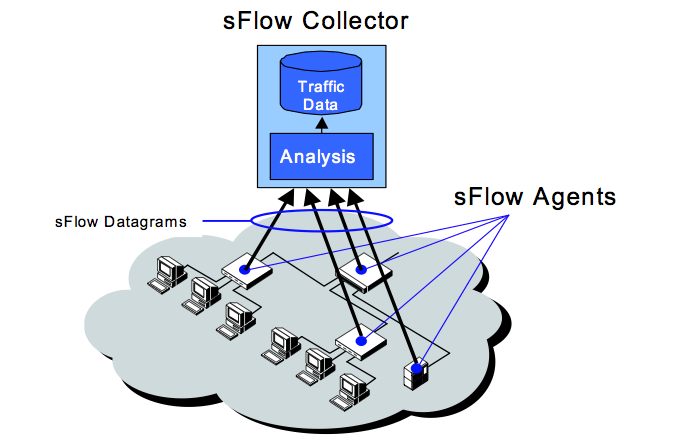
source: http://sflow.org
Now, since it is all about networking, why should you care about it if you're in the cloud business? While sFlow itself is defined as a standard to monitor networks, it also comes with a "host sFlow agent." Per the website:
The Host sFlow agent exports physical and virtual server performance metrics using the sFlow protocol. The agent provides scalable, multi-vendor, multi-OS performance monitoring with minimal impact on the systems being monitored.
Apart from this definition, you need to know that host sFlow agents are available for mainstream hypervisors, including Xen, KVM/libvirt, and Hyper-V (VMWare to be added soon) and can be installed on a number of operating systems (FreeBSD, Linux, Solaris, Windows) to monitor applications running on them. For the IaaS clouds based on these hypervisors, it means that it's now possible to sample different metrics of an instance (including I/O, CPU, RAM, interrupts/sec etc.) without even logging into it.
To make it even better, one can combine the "network" and "host" parts of sFlow data to provide a complex monitoring solution for the cloud:
A server exporting sFlow performance metrics includes an additional structure containing the MAC addresses associated with each of its network adapters. The inclusion of the MAC addresses provides a common key linking server performance metrics (CPU, Memory, I/O etc.) to network performance measurements (network flows, link utilizations, etc.), providing a complete picture of the server's performance.
This diagram shows the so-called sFlow host structure—the way of pairing host metrics with corresponding network metrics. You can see that to relate the "host" and "network" data, mapping of MAC addresses is used. Also, sFlow agents can be installed on top of the instance's operating system, to measure different applications' performance based on their TCP/UDP ports. Apart from combining host and network stats into one monitored entity, sFlow host structures also allow you to track instances as they migrate across physical infrastructure (by tracking MAC addresses).
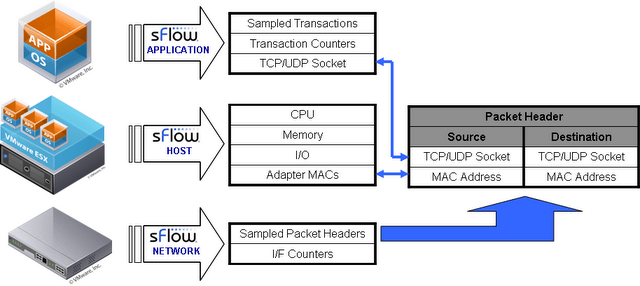
source: http://sflow.org
What does this all mean for OpenStack?
With the advent of Quantum in the Folsom release, a virtual network device will move from a Linux bridge to OpenvSwitch. If we add KVM or Xen to the mix, we will have an applicable framework to monitor instances themselves and their virtual network topologies as well.
There are a number of sFlow collectors available. The most widely used seem to be Ganglia and sFlowTrend, which are free. While Ganglia is focused mainly on monitoring the performance of clustered hosts or instance pools, sFlowTrend seems to be more robust, adding network metrics and topologies on top of that.
Since sFlow is so cool, it's hard to believe I couldn't find any signs of its presence in the OpenStack community (no blueprints, discussions, patches, etc.). On the other hand, sFlow folks have already noticed a possible use case for their product as one of the key OpenStack tools.
Conclusion
Cloud infrastructures have many layers and each of them requires a different approach to monitoring. For the hardware and service layer, all the tools have been there for years. And OpenStack itself follows well-established standards (web services, WSGI, REST, SQL, AMQP), which prevents sysadmins from having to write their own custom probes.
On the other hand, OpenStack's ability to track the resources it governs is rather limited now—as shown above, only the compute part is addressed and other aspects like networking and block storage seem to be left untouched. For now the user must assume that the status of the resources reported by OpenStack monitoring is unreliable. Unless this area receives more attention from the project, I would advise you to monitor cloud resources using third-party tools.
As for monitoring the cloud resources' performance, sFlow seems to be the best path to follow. The standard is designed to scale to monitor thousands of resources without serious performance impact and all the metrics are gathered without direct interaction with tenant data, which ensures privacy. The relationship between the host metrics and network metrics, plus the determination of network flows allows us to see how problems on a given host affect the whole network (and possibly other hosts).
To properly monitor all the layers of the architecture, it is currently necessary to employ a number of different tools. There is a great market niche now for startup companies to integrate tools such as sFlow into existing cloud platforms. Or maybe even better—provide one, complex solution, which could monitor all the cloud aspects on a single console.


