
Using an orchestrator to improve Puppet-driven deployment of OpenStack
One of the complexities of the OpenStack installation process is that there are multiple dependencies between components distributed among different nodes. As a result the Puppet agent must run multiple times on each node and preserve the specific order of execution. Here, I want to make the argument that use of a centralized orchestrator for managing Puppet agents can improve the process by making it more deterministic.
In this post, I'll describe an approach for using Puppet's Mcollective as a central orchestrator for push-based provisioning of nodes in OpenStack Compute and Swift clusters. We created deployment scenarios for these two cases and implemented them using Mcollective. These scenarios can be also implemented with other orchestration engines, such as Salt Stack.
The following diagram gives an overview of the architecture of the Mcollective orchestration manager function.
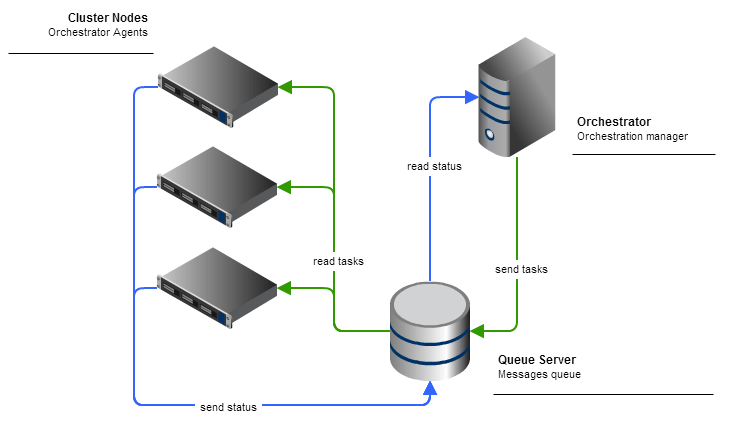
Compute cluster installation
We're installing the Essex release of the OpenStack platform. Three types of nodes can be deployed in a Compute cluster:
- Controller. This node hosts the state database, queue server, and dashboard.
- Compute. This node runs nova-compute, volume, and network services. It also runs Nova, Glance, and Keystone API server instances for redundancy and resiliency, as our reference architecture suggests.
- Endpoint. This node runs the load balancer service, which ensures scalability and service resiliency. This can either be managed by Puppet or not, in the case of hardware load balancers.
Step 1. Initial controller installation The Puppet agent on the primary controller node installs all components and initiates MySQL multi-master replication configuration. Due to the lack of a secondary controller at this step, some replication tasks can't be finished successfully, but that's okay. They'll be finished on the following run.
The Puppet agent on the secondary controller node installs the components and initiates replication. Look for details of the MySQL replication approaches we're using in this comprehensive article by Piotr Siwczak.
Step 2. Commencing replication: Once both controllers are up and running, the replication process begins. It requires one more run of the Puppet agent on every controller.
With MySQL-MMM managing replication, we need to wait until it assigns a writer IP address to the active master server before proceeding to installation of the Compute nodes. We need to make sure the writer IP address is accessible.
Step 3. Compute node installation: Compute nodes are installed independently from each other; however, database access is required for successful deployment of all compute services.
Compute nodes export some resources that can later be used by other modules, primarily the HAProxy module to compose configuration for the load balancer node.
Step 4. Endpoint node installation: The endpoint node must be installed last in this sequence. It uses exported data from the Compute and controller nodes to create a configuration of the load balancer that distributes requests between redundant services.
Step-by-step installation script
Now, armed with knowledge of the necessary steps, we create the following scenario:
- Run the Puppet agent on one of the controlled nodes. Wait until it finishes. You will see some errors during this run (that’s normal).
- Run the Puppet agent on the second controller node. Wait until it finishes. Some errors will still appear; again, this is normal.
- Continue running Puppet until all the errors have disappeared (you actually run the Puppet agent three times on each node).
- Ensure that MySQL-MMM has started and assigned a shared address to one of the controller nodes.
- Now you can start the Puppet agent on the Compute nodes. It exports information about the API servers, among other things.
- The Puppet agent that was started on the endpoint node will configure the load balancer server and run it.
Installation for OpenStack Swift cluster
There are three node roles defined for the Swift cluster by the Puppetlabs modules for installing OpenStack:
- Ring-builder. This node is used to create, rebalance, and distribute ring files among cluster nodes. This role should be assigned to a Swift proxy node only. It’s important that only one node in cluster has this role.
- Proxy. This node exposes the API and handles the authorization for clients.
- Storage. This node provides storage and replication functions to the cluster.
Step 1. Storage node installation The Puppet agents on the storage node install the Swift software and export resources that contain information about devices contained on the storage node. Storage nodes are deployed independently from each other.
Step 2. Ring-builder node installation: The ring-builder Puppet module works on the ring-builder node to create ring files. It uses data from resources exported from the storage nodes by Puppet agents to add storage devices to the ring.
Step 3. Ring distribution: As storage nodes are not operational without ring files, the next step requires that ring files be distributed to storage nodes. The Puppet agent with the Swift module performs this function, and must be executed on each storage node.
Step 4. Proxy node installation: Proxy node installation is the last step in the deployment process. The Puppet agent installs the Swift proxy software and the Keystone identity service and grabs ring files from the ring-builder node.
Step-by-step installation script
Now we can compose a scenario for installation of the Swift cluster:
- Run the Puppet agent on the storage nodes. Each storage node exports information about devices to the Puppet master.
- Run the Puppet agent on the ring-builder node. The ring builder creates all the rings using information about devices from the Puppet master. Also it exports information about the ring (rsync share).
- Run the Puppet agent on the storage nodes again. Each node downloads the ring from rsync share, which was exported by the ring builder.
- Run the Puppet agent on the proxy nodes to finish installation.
Mcollective implementation details
Here is a description of the environment for the orchestrator component in the nodes.yaml configuration file, using the following format:
# Example Orchestrator's yaml config file.
 swift:                   # Object storage cluster configuration
     storage:             # Nodes of type 'storage'
         nodes: [storage-01, storage-02, storage-03] # List of node names, as defined in Puppet
         filter: storage  # Search filter
     proxy:               # Nodes of type 'proxy'
         nodes: [proxy]
         filter: proxy
     ringbuilder:         # Nodes of type 'ringbuilder'
         nodes: [proxy]
 compute:                 # Compute cluster configuration
     controller:          # Nodes of type 'controller'
         nodes: [ctrl-01, ctrl-02]
         filter: ctrl
     compute:             # Nodes of type 'compute'
         nodes: [compute-01]
         filter: compute
 mysql: 10.168.123.2      # Virtual IP of multi-master MySQL cluster
We created a Ruby application os-orchestrator, which uses a MCollective::RPC module to communicate with the MCollective agents running on nodes via the AMQP RPC mechanism provided by MCollective. The BaseCluster class of the application handles operations with a configuration file and runs Puppet agents. SwiftCluster and ComputeCluster classes based on BaseCluster define the deployment logic described above.
Conclusion
Using the MCollective orchestrator can help with more then just initial installation of the cluster. Many operational tasks, including but not limited to capacity management, rolling upgrades, and configuration changes, can be automated with an orchestrator. A sound approach is to write an orchestration application based on orchestrator components, which could transfer a sequence of orchestration steps into a single job, which could just be spawned in those scenarios.(e.g., upgrade_compute_nodes).


